
REVIEW · SEOUL
South Korea eSIM (3-30 days. Up to 45GB)
Book on Viator →Operated by Xplori · Bookable on Viator
Internet setup beats the airport grind.
This South Korea eSIM from Xplori is built for one simple goal: keep you connected fast, with data you can use right away for maps, messaging, and planning. I like that it’s delivered digitally by email and activated by scanning a QR code, so you can get online within minutes instead of hunting for a SIM counter. It also uses local rates and includes 4G/5G where available, which matters because the best connection in Seoul is the one that’s working when you land.
The second thing I really like is how it’s set up to connect automatically to the strongest local network. From the feedback I saw, people were getting dependable service around Seoul and even on a trip out to Jeju, without messing around to keep switching networks. That kind of reliability is exactly what you want for finding your way through dense neighborhoods and getting back to your hotel after a long day.
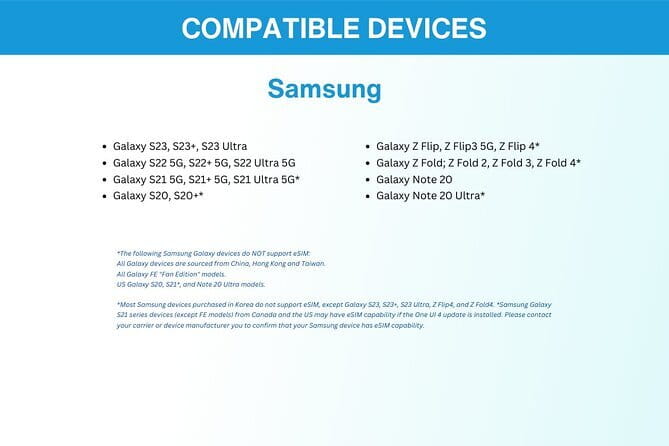
One consideration before you buy: you must have an eSIM-compatible phone (like iPhone XS and later, Pixel 3 and later, or Samsung S20/S21/Fold). There’s also a practical activation tip that came up—if things seem stuck after you turn on roaming, restarting your device can help fully activate the profile.
In This Review
- Quick Takeaways
- What This eSIM Really Does in South Korea
- Pricing and Value: Is $5 Enough to Trust?
- Getting Started: From Your Inbox to Online in Seoul
- Data Speeds That Matter: 4G/5G Up Front, 3G After the Cap
- Coverage Reality Check: Seoul, Then Beyond
- Activation Tips That Save Time (and Sanity)
- Customer Service by Email: When You Need Help Fast
- How It Fits Different Trip Styles
- Practical Drawbacks to Know Before You Buy
- Should You Book This eSIM for Your Seoul Trip?
- FAQ
- How do I receive the South Korea eSIM?
- Do I need an eSIM-compatible phone?
- How do I activate the eSIM in South Korea?
- What data speeds are included?
- What should I do when I land in South Korea?
- Is there customer service available if something goes wrong?
- Can I cancel and get a refund?
Quick Takeaways
- Email delivery, quick activation: eSIM arrives by email, then you activate by scanning the QR code and get connected within minutes.
- 4G/5G where available: you’re covered for fast data in supported areas, not stuck on slow speeds from the start.
- Auto network connection: you should connect to the best local network automatically for easier day-to-day use.
- Seoul to Jeju reliability: the setup is used successfully beyond central Seoul, including a Jeju trip.
- High-speed cap, then 3G: once your included high-speed data is used, speed switches to 3G rather than cutting you off.
- Support by email: remote customer service is available if something goes sideways.
What This eSIM Really Does in South Korea
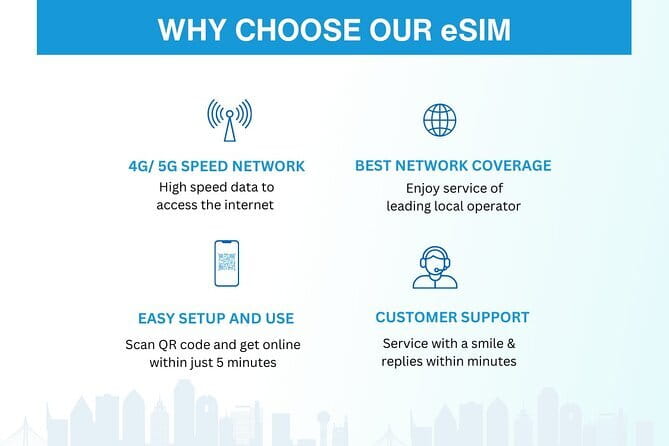
This is a digital product that gives you mobile data in South Korea for a selected number of days (options run from 3 to 30 days, depending on your trip length). Think of it as your travel internet plan. You use it to look up transit, book rides, message family, and avoid the all-too-common moment of standing outside the wrong entrance with your phone at 1%.
Because it’s an eSIM, you don’t physically swap SIM cards. Instead, you activate a profile on your phone. That removes a lot of the friction: no airport line, no language struggle at a kiosk, and no need to keep track of a tiny SIM card in your pocket.
You can also read our reviews of more tours and experiences in Seoul.



Pricing and Value: Is $5 Enough to Trust?
The price listed is $5.00 per person, which is strikingly low for something that can save you from both time and stress. The value comes from what you avoid. Airport SIM purchases often mean a slow line, a confusing setup, and a higher chance of buying the wrong plan for your phone. With an eSIM, you handle the setup before you’re stuck in an arrivals crowd.
Now, there’s a catch with any budget-friendly data product: you’re relying on correct phone compatibility and a smooth activation. If your phone doesn’t support eSIM, or if you arrive and discover you need one extra step, the cheap cost won’t feel cheap anymore. Still, for most eSIM-ready phones, the setup path here is straightforward: scan the QR code, connect, and go.
Getting Started: From Your Inbox to Online in Seoul
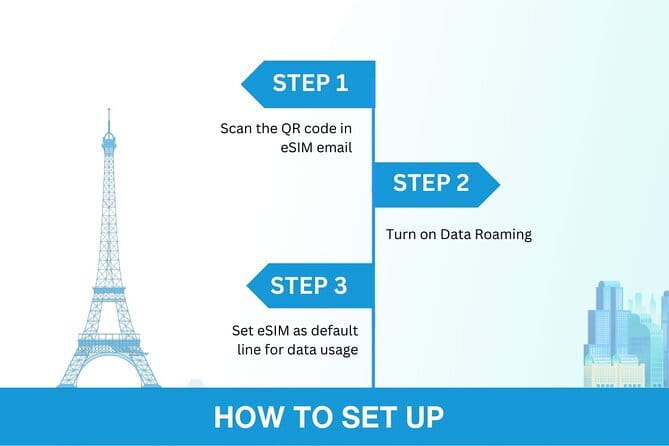
After you order, you get the eSIM by email. That’s your first win. You don’t have to plan a pickup point or coordinate with a booth at the airport. The whole process starts wherever you can access your email and scan a QR code.
Once you scan the QR code, activation happens quickly—fast enough that you can realistically be online early in your arrival day. The data profile is also meant to connect for the duration you selected, so you’re not paying attention to day-by-day renewals while you’re trying to enjoy Seoul.
One practical tip that came up in the feedback: when you land, you may need to turn on your data roaming to get the connection fully working. If it still feels incomplete, restarting your device can help the profile lock in and start behaving correctly.
Data Speeds That Matter: 4G/5G Up Front, 3G After the Cap
The eSIM includes 4G/5G data where available, which is the difference between a phone that’s useful and a phone that just loads slowly. In practice, faster data means:
- Maps that update smoothly
- Messaging apps that send attachments without delays
- Streaming and video calls that are realistic, not painful
But the plan is not unlimited high-speed data. It includes a high-speed allowance, and after that, the speed switches to 3G. The key detail here is not that 3G is useless—it’s that you should manage your expectations after you hit the cap. If you plan to stream constantly for a 3-week trip, you might hit the threshold sooner than you’d like.
Also, the description uses the phrase unli 3G data speed and says you won’t lose connectivity once you’re in the 3G phase. I’d read that as: you keep working, just at a slower pace, not that your service shuts off.
Coverage Reality Check: Seoul, Then Beyond
This eSIM is for South Korea, with Seoul listed as the location. The most meaningful real-world detail from the feedback is the confirmation of reliability beyond Seoul center. One person described solid performance from Seoul through a trip to Jeju, which is exactly the kind of route that stresses a phone plan.
Jeju matters because it’s not just another neighborhood. You’re often dealing with longer rides, ferry or flight travel, and more time with your phone open for directions. If your data plan works there, it’s usually a good sign it’ll handle the everyday needs of a city break.
There is one confusing line in the product description: it says the data plan covers all Canadian provinces. That doesn’t match the South Korea use case, so I’d treat it as something to double-check before relying on it. If the coverage details aren’t clear for your travel route, email the provider support before you leave.



Activation Tips That Save Time (and Sanity)

Activation sounds easy, and it usually is. But phones are messy. Here’s the practical way to think about it so you don’t waste your first evening troubleshooting.
First, make sure your phone supports eSIM. The listed compatible models include iPhone XS and later, Pixel 3 and later, and Samsung S20/ S21/ Fold. If you’re unsure, contacting support in advance is smart. It costs nothing compared to arriving with a phone that can’t use the profile you bought.
Second, after activation, treat roaming as a switch you might need to flip. The feedback included an explicit note: on landing, you may need to turn on your data roaming. That’s normal for many travel SIM setups, even when the profile is already installed.
Finally, if it looks activated but doesn’t fully behave, restart your device. That’s the kind of fix you want to know ahead of time, because it’s faster than going through menus and rebooting anyway later.
Customer Service by Email: When You Need Help Fast
This product includes remote customer service by email. That might not sound exciting, but it’s a big deal for eSIMs. If something doesn’t activate, you want a clear path to fix it without guesswork.
In the feedback, service was described as excellent, and that matches what you’d want when your phone is your only travel tool. If you run into issues, email support early rather than waiting until the day you need maps at rush hour.
One detail to note: the delivery says you should share this info or contact support. That implies the provider needs the right email details tied to your order so the QR code arrives correctly. Before you travel, double-check that the email on your booking is accurate and reachable.
How It Fits Different Trip Styles
This kind of eSIM is best for people who want their phone to work as a travel assistant. If you’re doing a classic Seoul itinerary—transit rides, neighborhood wandering, and lots of photo sharing—this plan supports that day-to-day rhythm.
It also works well for:
- People who dislike airport logistics and want setup done at home
- Families or couples who need reliable data to coordinate
- Travelers who will use messaging and navigation daily, plus some video calls
It may be less ideal if you only need the internet occasionally. In that case, you might be able to stretch with less data or rely on Wi‑Fi more. But since you’ll likely be out and about a lot in Seoul, the ability to use data without hunting for Wi‑Fi is the main convenience win.
Practical Drawbacks to Know Before You Buy
The biggest drawback is the same one that applies to all eSIM travel plans: your phone must support eSIM. If it doesn’t, there’s no workaround here inside the product details.
A second downside is about the data cap. After high-speed data runs out, speed drops to 3G. If you plan to stream for hours every day, you might feel it sooner than you expect. The fix isn’t complicated—just treat the cap as a signal to use Wi‑Fi when it’s available and save heavy streaming for when you still have high-speed data.
Finally, the product is digital only. There’s no pickup or meetup point. That’s great when things go smoothly, but it means you should be ready to handle the setup yourself through email and QR activation.
Should You Book This eSIM for Your Seoul Trip?
You should book it if you’re traveling with an eSIM-compatible phone and you want reliable mobile data in Seoul (and beyond) without wasting time on airport SIM counters. The setup is quick, the plan is inexpensive, and the recurring activation and reliability tips—like turning on data roaming and restarting if needed—are exactly the kind of small knowledge that prevents travel stress.
Skip it or double-check first if:
- Your phone model isn’t clearly eSIM-compatible
- You might be unsure about how roaming should be enabled on your device
- You’re planning heavy streaming for a long trip and the high-speed cap might be too small
If you’re a practical traveler who wants your phone working from the moment you land, this is the kind of low-cost, low-friction upgrade that makes the trip feel easier.
FAQ
How do I receive the South Korea eSIM?
You receive it by email after your order, then you can scan the QR code to activate the eSIM profile.
Do I need an eSIM-compatible phone?
Yes. The product lists compatible phones including iPhone XS and later, Pixel 3 and later, and Samsung S20/ S21/ Fold.
How do I activate the eSIM in South Korea?
After you receive the email, scan the QR code and activate the eSIM profile. After activation, you should be connected within minutes.
What data speeds are included?
The eSIM includes 4G/5G data where available. After you use the included high-speed amount, speeds switch to 3G.
What should I do when I land in South Korea?
You may need to turn on your data roaming to get the connection working fully.
Is there customer service available if something goes wrong?
Yes. The provider offers remote customer service by email.
Can I cancel and get a refund?
Yes. Free cancellation is available. You can cancel up to 24 hours in advance for a full refund.