REVIEW · SEOUL
South Korea: Unlimited Data and Voice eSIM
Book on GetYourGuide →Operated by LINK KOREA · Bookable on GetYourGuide
Your phone can work from day one. I like that you get unlimited 4G LTE data without speed throttling on SK Telecom, so maps and messaging stay steady. I also like the QR-based setup flow once you’re in Korea. The main drawback: getting everything right can take time if your phone isn’t fully eSIM-ready, and voice features require extra passport verification.
If your priority is constant internet, this is a straightforward pick. Hotspot sharing is supported, which helps if you’re traveling with someone and want one connection for two devices. Just plan on the fact that voice and SMS come after online verification, not automatically at first connection.
In This Review
- Quick hits before you buy
- Unlimited 4G LTE eSIM in South Korea: what you really get
- Price and value: is $8 fair for 3 to 90 days?
- Before you land: eSIM compatibility and QR-code timing
- Arrival and activation on SK Telecom: connecting in real life
- Voice and SMS: the passport verification step you can’t skip
- Calls and texts: incoming vs outgoing
- What my phone workflow looks like (and how you can copy it)
- Hotspot sharing and device planning
- Troubleshooting: when the QR code says invalid or data disconnects
- Who this eSIM suits best (and who should be careful)
- The bottom line: should you book this unlimited eSIM?
- FAQ
- FAQ
- How do I get the correct QR code for the eSIM?
- What phone check should I do before buying?
- When does the eSIM start working after I arrive?
- Is voice and SMS available right away?
- Can I share the connection using a hotspot?
- What network does the eSIM use in South Korea?
- What should I do if the QR code shows as invalid?
- Who is eligible to buy this eSIM?
Quick hits before you buy
- Unlimited data, no speed throttling on SK Telecom’s 4G LTE network
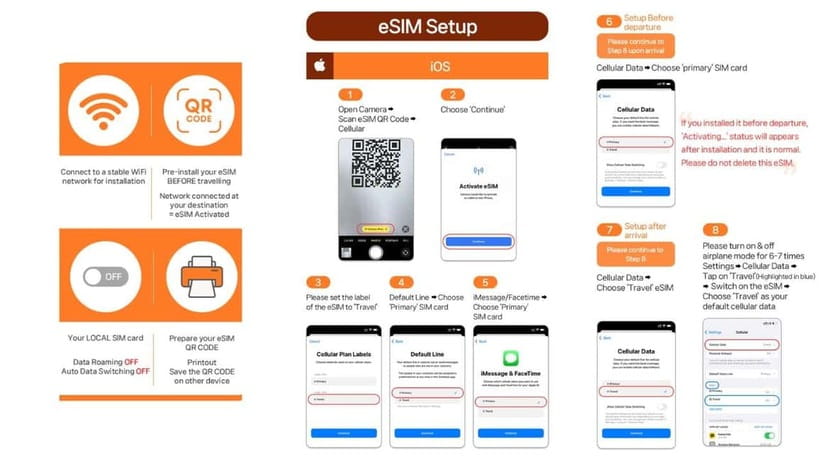
- QR code timing matters: you’ll get the eSIM QR separately by email (about 1 day before)
- Voice and SMS need passport verification through SK Roaming’s system
- Activation starts when you connect in Korea, based on hours (so don’t delay)
- Hotspot sharing works, handy for navigation and regrouping
- Support is real: contact LINK KOREA if you hit QR or activation issues
Unlimited 4G LTE eSIM in South Korea: what you really get
This is a tourist-focused eSIM for South Korea where the headline is simple: unlimited 4G LTE data on SK Telecom. In practice, that means you can rely on navigation apps, translation tools, ride hailing, and messaging without watching a data meter.
I also like how the product is built around arriving in Korea and getting online fast. You connect by adding the eSIM using a QR code you receive separately, then it activates after you’re in-country and connected to SKT’s network.
The value is best if you’re the kind of traveler who uses your phone constantly. If you mostly use Wi-Fi and only check messages now and then, you might not need unlimited. But if you’re navigating all day, paying $8 for unlimited data for multiple days can be a bargain.
You can also read our reviews of more tours and experiences in Seoul.



Price and value: is $8 fair for 3 to 90 days?
The price point is low enough that you should compare it against what you’d pay for short-term roaming. Here, you’re buying one thing: high-use data access on a major local carrier.
Validity ranges from 3 to 90 days, depending on the plan you choose. The big “value math” is that unlimited data removes a lot of decision-making. You don’t have to ration usage, and that saves stress on travel days.
One catch: voice and outgoing messaging are not included as a full calling plan. The base promise emphasizes incoming calls and text messages, with call and text functions tied to verification and credits. So if you rely on making lots of outgoing calls or sending lots of texts, you need to understand what’s included for your specific use case.
Before you land: eSIM compatibility and QR-code timing
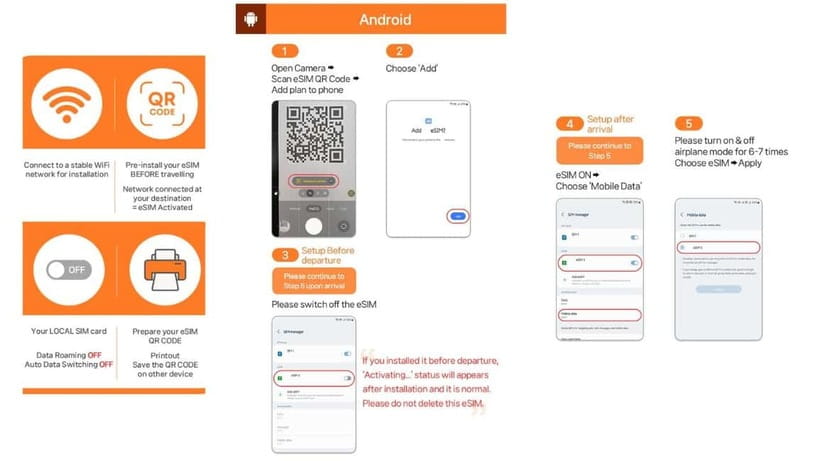
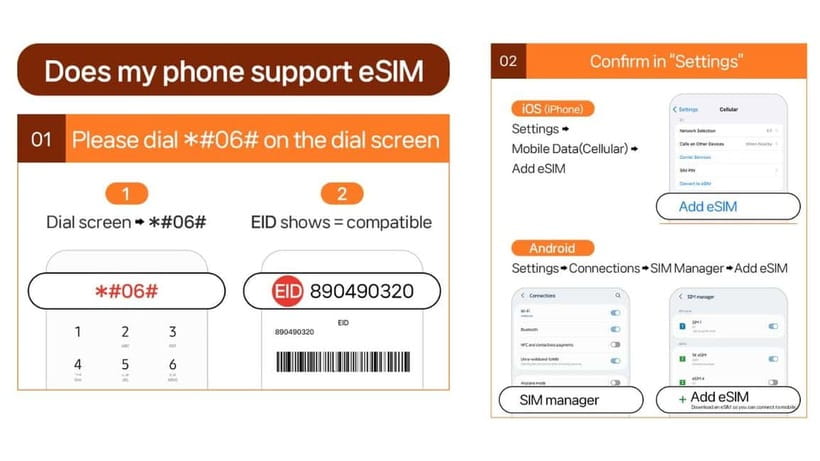
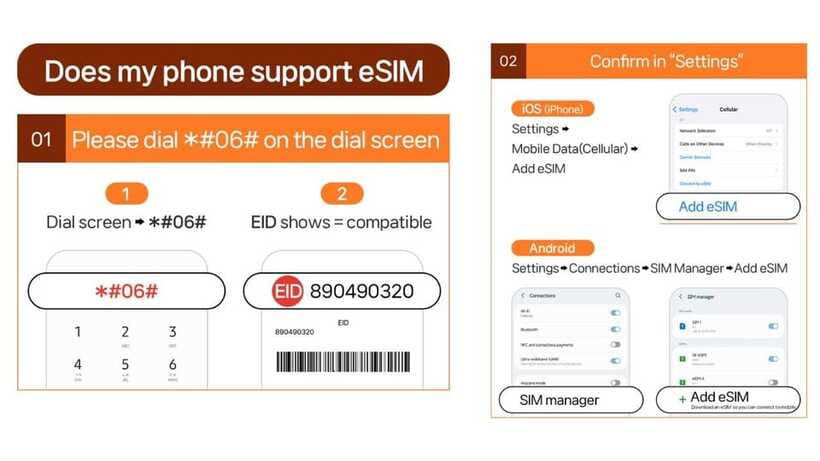
Plan for the admin part before you arrive, not at 11:30 at night. First, make sure your phone supports eSIM. You can check by dialing #06# and seeing whether an EID shows. If there’s no EID, your device likely won’t support eSIM.
Second, don’t rely on the QR code in your voucher. The QR code shown on GetYourGuide is not the eSIM QR code. The eSIM QR code is delivered to you separately by email 1 day before the activity date.
This timing detail matters because it affects your whole setup rhythm. If your phone supports eSIM, you can add the profile before you travel. But the eSIM actually connects to the local network and activates after you arrive in Korea. So you can still do the boring setup steps ahead of time, then just finish activation once you land.
Finally, your phone has to be unlocked for a foreign SIM/eSIM. If your phone came from the US, Canada, Japan, or the Philippines, pay extra attention to unlocking status, since that’s specifically called out.
Arrival and activation on SK Telecom: connecting in real life
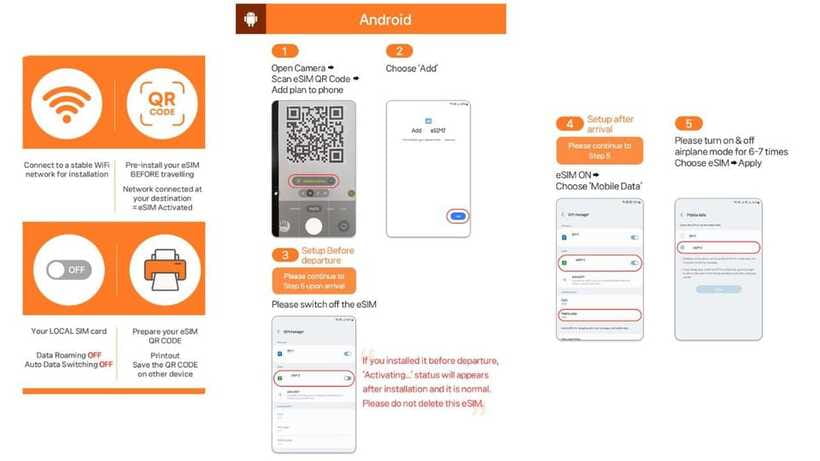
Once you’re in South Korea, the eSIM is designed to connect based on hours. It starts instantly when it’s connected to SK Telecom’s network, and the service window runs according to that timing (hours-based, not calendar-day based).
That means you should treat activation like pressing the start button. If you delay connection for hours after landing, you might shorten the “usable days” you expected. A simple rule: when you’re ready to navigate and use data, connect the eSIM and confirm it’s working.
Hotspot sharing is supported, so you can use your phone like a mini router. This is useful if you’re carrying a tablet or a second phone that doesn’t have an eSIM slot.
For network type, you’re on 4G LTE. That’s not 5G everywhere, but it’s usually plenty for maps, video calls, and uploading photos at a travel pace.
Voice and SMS: the passport verification step you can’t skip
Data is the easy part. Voice and SMS are where the hoops are.
The plan provides a Korean phone number (a 010 number) for voice and text services, but those features only activate after online verification. Verification uses a passport-based User ID system through SK Roaming.
Here’s the practical flow:
- You’ll need to do passport verification through the SK Roaming passport system.
- Verification works within operating hours 08:00 to 22:00 every day.
- Verification can only be performed starting 1 hour after entry.
- Only foreigners with an overseas passport are eligible. If you have a Korean passport, you can’t buy.
- One passport can only register one phone number.
Also note the product detail that voice/SMS is tied to the SIM being validated online. It’s specifically stated that the SIM/eSIM can only be used for data services before validation, meaning you should not count on texting or calling until verification is finished and completed.
If you’re collecting multiple SIMs/eSIMs under one passport, be aware that each SIM has to be validated online by each user to activate call functions. It’s a paper-cut issue, but it matters if you’re traveling with multiple lines for a group.



Calls and texts: incoming vs outgoing
The included benefits emphasize incoming calls and text messages without additional charges. Outgoing calls and outgoing SMS are listed as not included.
There’s also a note about complimentary voice credits: 1,320 KRW voice credits are included for domestic calls (described as roughly five minutes of domestic calling until a specific rate). The most important thing for you is the direction: your voice/SMS capability is not a full unlimited calling plan. It’s a boost for basic connectivity so you can handle calls and messages without paying roaming.
After voice is activated, you’re told you must recharge online before using the call feature again. The recharge site is listed at https://skroaming.com/reservation/charging.
What my phone workflow looks like (and how you can copy it)
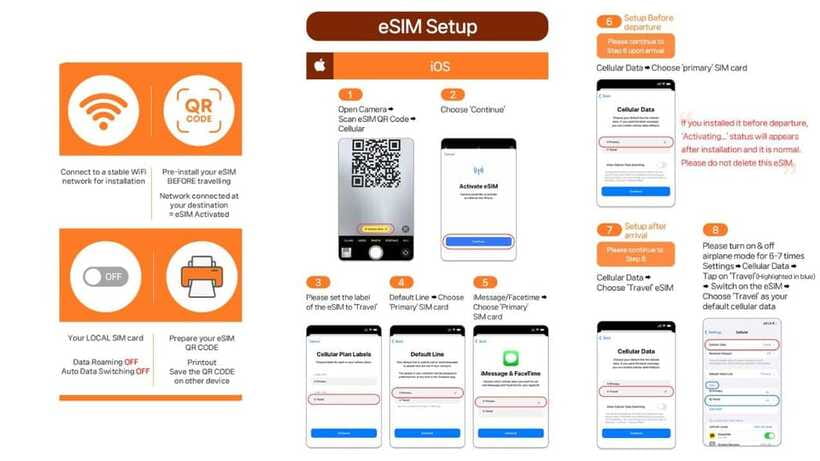
When I’m trying to avoid stress in a new country, I treat the eSIM like a short checklist.
1) Check compatibility before purchase
Make sure you can see EID after dialing #06#. Also confirm your phone is unlocked.
2) Wait for the correct QR code
The voucher QR is not the eSIM QR. Use the QR code delivered by email 1 day before.
3) Arrive, then connect
The eSIM connects and activates after you arrive in Korea. Don’t assume it will be active the second you land without confirming.
4) Confirm data immediately
Once connected, confirm data is passing through (maps load, app updates work). If data drops later, don’t panic—jump to the troubleshooting steps below.
5) Do the voice verification when you’re ready
Verification isn’t instant at landing. It’s time-windowed and only works after entry plus a one-hour wait. If you need voice quickly for pickup or meeting plans, plan your verification timing early in your stay.
If you want a simpler day-one experience, use this approach. It reduces the “where did the QR go” and “why isn’t voice working yet” issues that can turn a smooth arrival into a frustrating one.
Hotspot sharing and device planning
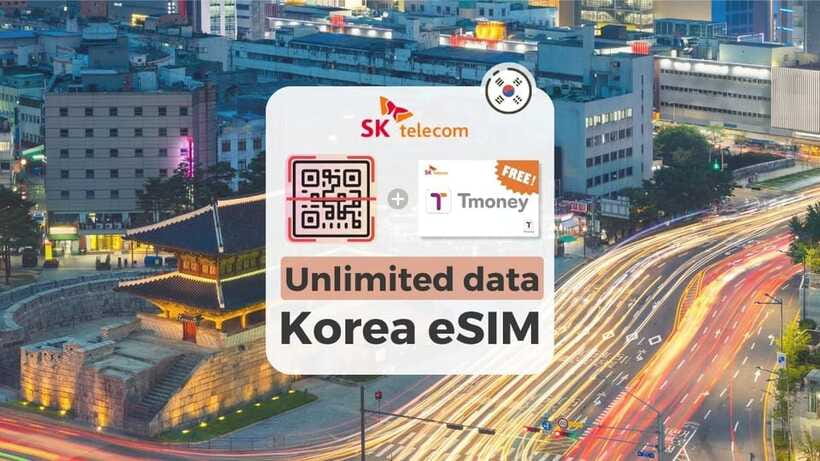
Hotspot sharing is explicitly supported, which is a big deal if your travel setup is more complex than just your phone.
If you’re carrying a laptop without eSIM support, hotspot can cover basic browsing and messaging. It’s also helpful if you and your companion each have different devices and you want one stable connection.
Keep in mind you’re still on 4G LTE, so don’t expect unlimited high-bandwidth streaming at the same quality you might get on hotel fiber. But for typical travel use—maps, messaging, uploading a few photos, basic browsing—you should be fine.
Troubleshooting: when the QR code says invalid or data disconnects
This is the part nobody wants to read, but it can save hours.
If you see a message like QR code is invalid, do not assume the purchase failed. The guidance is to check whether an eSIM profile is actually appearing in your settings:
- iOS: Settings > Cellular
- Android: Settings > Connections > SIM Manager
Look for whether a new eSIM shows up there. If it does, the profile is being recognized by your phone even if the QR flow message was confusing.
If you still can’t fix it, contact the provider support. The listed help contacts are:
- Email: [email protected]
- WhatsApp: https://wa.me/message/R7WRWPD6T67UM1
Also, plan for a realistic possibility: eSIM activation can be easy on one phone and fiddly on another. Some people report smooth, quick installs and stable signal. Others find activation takes longer and may require adjustments before everything stays connected.
My practical advice is to keep your arrival day flexible. If you can, avoid scheduling critical calls for the exact moment you’re setting up. Give yourself time to confirm data works before you rely on it for navigation or meeting instructions.
Who this eSIM suits best (and who should be careful)
This eSIM fits best if you:
- want unlimited 4G LTE data without tracking usage
- plan to use your phone for navigation and daily messaging
- are traveling short-term in South Korea (this is described as a tourist product for stays within 90 days)
- have an unlocked phone with eSIM support
Be careful if you:
- are unsure whether your phone supports eSIM
- need voice and SMS immediately at arrival (voice requires passport verification and a one-hour-after-entry rule)
- rely heavily on outgoing calls and outgoing SMS, since outgoing is listed as not included
There’s also an eligibility and residency warning to take seriously. It’s for foreigners with overseas passports. If your stay is 91 days or longer, service limitations may apply or the line could be suspended without prior notification, and refunds won’t be issued in that situation.
So this is a clean solution for a trip, not a long residency plan.
The bottom line: should you book this unlimited eSIM?
I’d book it if your main goal is dependable internet in South Korea at a fair price. Unlimited data, SK Telecom network access, hotspot support, and a multi-day validity window make it a good match for active travel.
I’d think twice if you need outgoing calls and lots of SMS, or if your phone’s eSIM setup is uncertain. In that case, you might save yourself stress by double-checking eSIM support before purchase and starting activation as soon as you land.
If you do book, here’s the smartest way to reduce risk:
- Confirm your phone shows EID before buying.
- Use the eSIM QR emailed separately, not the voucher QR.
- Activate and test data right away after arrival.
- If voice matters, plan passport verification in the 08:00 to 22:00 window and remember the 1-hour after entry rule.
FAQ
FAQ
How do I get the correct QR code for the eSIM?
The QR code in your voucher is not the eSIM QR code. The eSIM QR code is delivered to you separately via email about 1 day before the activity date.
What phone check should I do before buying?
Your device needs to support eSIM. Dial #06# and check whether EID shows. If no EID appears, your device is not compatible.
When does the eSIM start working after I arrive?
The eSIM connects to the local network after you arrive in Korea, and activation starts instantly when it connects to SK Telecom’s network based on hours.
Is voice and SMS available right away?
No. Voice and SMS require online verification. Data services can work first, but call and text features activate after you complete the verification.
Can I share the connection using a hotspot?
Yes. Hotspot sharing is supported.
What network does the eSIM use in South Korea?
It runs on SK Telecom’s network with 4G LTE data access.
What should I do if the QR code shows as invalid?
Check your phone settings to see whether a new eSIM profile appears (iOS: Settings > Cellular; Android: Settings > Connections > SIM Manager). If it still doesn’t work, contact LINK KOREA by email or WhatsApp.
Who is eligible to buy this eSIM?
Only foreigners with an overseas passport are eligible. Korean passport holders are unable to buy.